Getting verified on a UK cam site is the very first, non-negotiable step before you can go live and start earning. It's a strict identity and age check where you prove you are who you say you are, using official documents like a passport or driving licence. Think of it less as a chore and more as the bouncer on the door checking your ID; it's a legal requirement designed to keep everyone safe, stop fraud, and make sure the whole operation stays on the right side of UK law.
Consider it your professional entry ticket. Without it, you’re just another profile. With it, you’re a creator.
Why Verification Exists and What It Means for You
Let’s be real, the verification process can feel a bit much. You’re being asked to upload sensitive personal documents to an adult site, and it’s completely normal to feel a bit weird about that.
But it’s important to see this for what it is: a crucial legal and ethical firewall, not just arbitrary gatekeeping. Without these checks, the industry would be a chaotic Wild West, rife with fraud, underage performers, and serious legal trouble for everyone involved.
The Legal and Financial Realities
Platforms don't make you jump through these hoops for kicks. They're legally and financially backed into a corner and have to run a rock-solid verification system.
- UK Law (The Online Safety Act): This is the big one. The Act puts a massive legal duty on platforms to stop kids from seeing adult content. If they fail to use 'highly effective' age verification, they face eye-watering fines of up to 10% of their global turnover. The days of a simple "I am 18" checkbox are long dead.
- Payment Processors: Companies like Visa and Mastercard have their own strict rulebooks. They flat-out refuse to work with any adult platform that can't prove it's meticulously vetting its creators and stamping out illegal activity. No verification means no way for you to get paid. Simple as that.
- Preventing Fraud and Impersonation: This process protects you, the creator. It stops someone from nicking your photos, setting up a fake profile in your name, and ripping people off. It ensures the person on screen is who they claim to be, which is the foundation of building any kind of trust with an audience.
Verification is the bedrock of legitimacy in this business. It's what allows a platform to operate legally, handle payments securely, and maintain a safe environment for both creators and users. Without that foundation of trust, the whole system would crumble.
What Verification Unlocks for You
Once you're through the gates, everything changes. Completing the UK cam site verification process is what flips the switch on your account, turning it from a static profile into a professional, money-making tool.
This is your key to unlocking all the monetisation features, which almost always include:
- Receiving Tips and Tokens: The bread and butter of how viewers show support and how you earn.
- Offering Private Shows: Lucrative one-on-one sessions that often make up a huge chunk of a creator's income.
- Using Pay-Per-View (PPV) Features: Selling access to exclusive content or pre-recorded videos.
- Setting Up Payouts: The final, most important step: connecting your bank account to actually get your hands on your earnings.
In short, verification is the line between being a lurker and being a broadcaster. It's the professional standard that shows you're a legitimate creator playing by the rules. This process is also tightly linked to community safety, a topic we explore in our guide on how cam platforms moderate content.
The Essential Document Checklist for UK Creators
Alright, let's get your paperwork sorted. Rocking up to verification with the wrong documents is the fastest way to get your application binned. Think of this as your pre-flight check for a smooth and speedy approval.
The entire UK cam site verification process boils down to proving two things: who you are and where you live. Platforms are incredibly strict about this because their payment processors and legal teams demand it.
Proving Your Identity: Who You Are
When it comes to proving you are who you say you are, sites need to see official, government-issued photo ID. This bit is non-negotiable. Your best bet is to stick with the gold-standard documents.
Make sure you have one of these ready and, crucially, that it's in-date:
- A valid Passport: This is the universal key. It's recognised everywhere and almost never questioned as long as it hasn't expired.
- A valid UK Driving Licence (or Provisional): Both full and provisional photocard licences are widely accepted. Just make sure the photo is a clear, recent likeness of you.
Why these? Simple. They’re packed with security features that are a nightmare to fake, which makes the platform's compliance job a hell of a lot easier. Things like student IDs, National Insurance cards, or birth certificates will be rejected on sight because they either don't have a photo or lack the necessary security measures.
Pro Tip: Before you even start, double-check the expiry date on your ID. An out-of-date passport or driving licence is an automatic rejection, no matter how perfect the rest of your application is.
Proving Your Address: Where You Live
This is where so many people get tripped up. The site needs to confirm you actually live at the address you’ve given them, and they can be frustratingly picky about the proof. The document must be recent—typically dated within the last three months—and the name and address have to match your ID and application details perfectly.
The documents they almost always accept include:
- Utility Bills: Your gas, electricity, or water bill is ideal. A recent council tax statement is also a solid choice.
- Bank or Credit Card Statements: A statement from a major high-street bank is another great option.
- Official Government Letters: Any recent correspondence from HMRC or the DWP will usually do the trick.
What catches people out are the documents that feel official but often get knocked back. Mobile phone bills are the classic example; for some reason, they're frequently rejected. Likewise, things like your TV Licence or a tenancy agreement can be hit-or-miss depending on the platform's specific rulebook. To be safe, just stick to the core utility and bank documents.
To help you get it right the first time, here’s a quick-reference table outlining what generally gets a thumbs-up versus what often gets declined.
Accepted vs Commonly Rejected Documents
| Document Type | What's Usually Accepted | What's Often Rejected |
|---|---|---|
| Proof of ID | Valid Passport, UK Driving Licence (Full or Provisional) | Expired IDs, Birth Certificates, Student IDs, CitizenCards |
| Proof of Address | Utility Bill (Gas, Electric, Water), Council Tax Bill, Bank Statement | Mobile Phone Bill, TV Licence, Tenancy Agreements, General Mail |
This isn't exhaustive, but it covers about 99% of cases. When in doubt, always go with the most official-looking document you have.
The Golden Rule: Your Details Must Match Exactly
Now for the single most critical piece of advice I can give you: the name and address on your proof of address document must be an exact match for the name on your photo ID. I’m talking character-for-character. No nicknames, no abbreviations, no slight variations in the street name.
If your driving licence says "Katherine Smith" but your bank statement says "Katie Smith," that’s a likely rejection. If your ID has you at "Flat 3, 10 Main Street" but your utility bill says "Top Floor Flat, 10 Main St," that little discrepancy is often enough to fail the check.
Consistency across all your documents is everything. Taking ten minutes now to ensure every single detail lines up perfectly will save you days of frustrating back-and-forth emails with the support team later.
Navigating Liveness Checks and Facial Scans
Once you’ve got your ID and proof of address sorted, the next hurdle is what's often called a 'liveness check' or facial scan. This part can feel a bit odd, almost like you're on a video call with a robot, but it's now a non-negotiable part of the UK cam site verification process.
Don't mistake this for a simple selfie. The software isn't just comparing your face to your ID photo; it’s confirming you are a real, living person holding that ID at that exact moment. It’s a clever way to stop someone from trying to pass off a stolen photo, a deepfake video, or even a good quality printout as the real thing.
Why This Step Is So Important Now
The move towards these high-tech checks hasn't happened by chance. With the UK's Online Safety Act breathing down platforms' necks to adopt 'highly effective' age assurance methods, the old ways are dead and buried. Simply ticking a box to say you're over 18 just doesn't cut it anymore.
The numbers really tell the story. A Statista survey from September 2023 revealed that before the new rules, 75% of UK users accessing adult sites just had to tick a box. In stark contrast, only 7% performed a photo scan and just 6% a full facial scan. This is precisely the loophole the new legislation is designed to close, forcing platforms to get serious about who's on their site.
This flow chart gives you a simple overview of how your documents lead up to this live check.
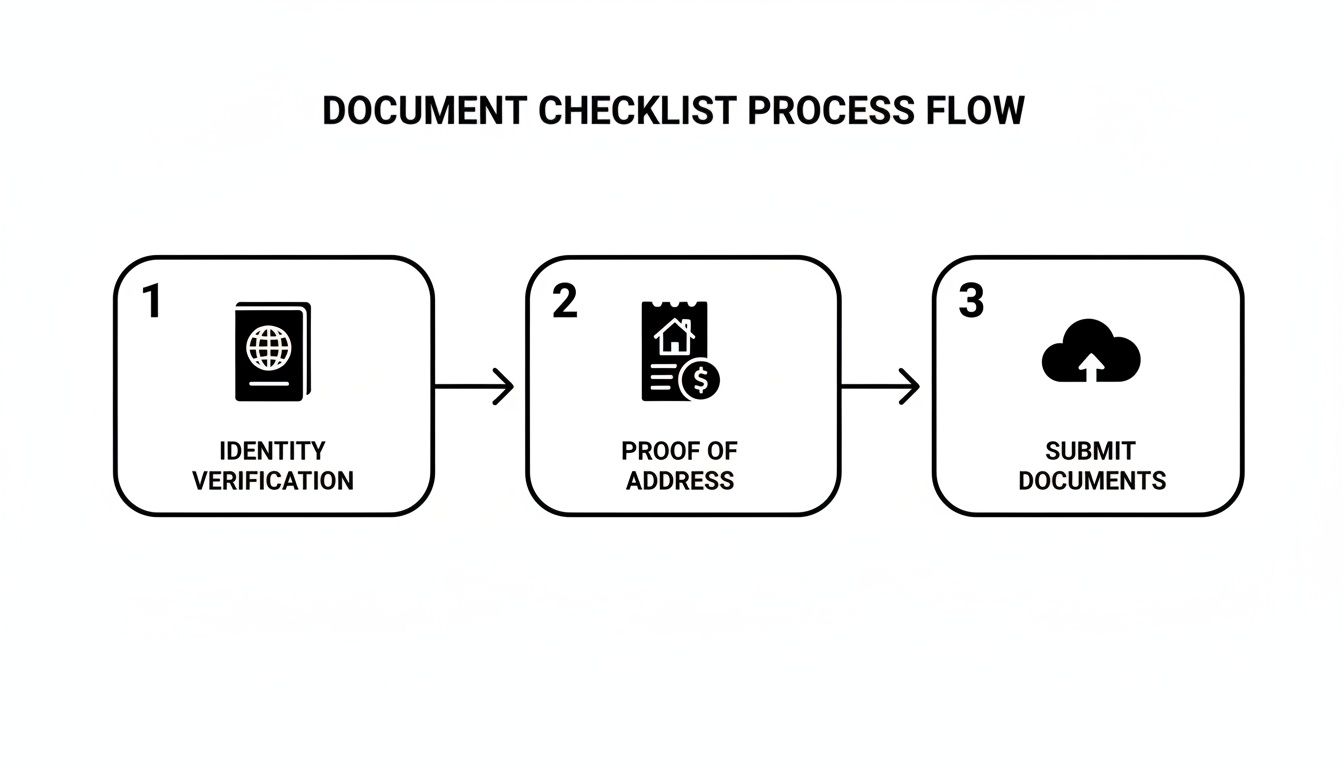
Each stage validates the one before it, with the liveness check acting as the final proof that you are who you say you are.
What to Expect During the Scan
Most sites use external verification services for this part, so don't be surprised if the interface looks a little different from the platform you're signing up for. The whole thing usually takes place directly in your web browser or on your phone, using your device's camera.
You’ll be prompted to do a few simple things. These aren't random requests; each action is a specific test to prove you're a three-dimensional, living person.
Common requests include:
- Holding your ID next to your face: The system needs a clear view of both your face and your ID photo in the same frame.
- Slowly turning your head: Looking left and right, or up and down, confirms your face isn't just a flat picture.
- Making a specific expression: You might be asked to smile or blink. It feels a bit silly, but it’s an effective way to prove you’re not a mask or a static image.
- Reading a random phrase aloud: Some advanced systems add another layer by matching your facial movements to spoken words.
The key here is to just follow the on-screen instructions precisely. The AI isn't judging your appearance; it's hunting for specific data points to confirm you're real. Don't overthink it—just do exactly what it asks.
Common Mistakes and How to Avoid Them
Failing the liveness check is incredibly frustrating, but from my experience, the reasons are nearly always simple and easy to fix. A little bit of prep can help you nail it on the first go.
Pro Tips for a First-Time Pass:
- Lighting is Everything: Find a well-lit space where the light source is in front of you. If the light is behind you, you'll look like a silhouette, and the AI will throw a fit. Natural daylight from a window is perfect.
- Check Your Webcam: Give your camera lens a quick wipe before you begin. A blurry image from a smudged lens is a guaranteed fail. If your built-in webcam is potato-quality, switch to your phone—the camera is almost certainly better.
- Mind Your Fingers: This one trips people up constantly. When you hold your ID, make absolutely sure your fingers aren't covering any part of your photo, name, date of birth, or document number. Even a thumb grazing the edge can get you rejected.
- Remove Distractions: Take off any hats, sunglasses, or anything that might obscure your face. The system needs an unobstructed view to match you to your ID.
- Find a Plain Background: A busy, cluttered background can sometimes confuse the software. Standing or sitting in front of a plain wall helps the AI focus on you and your ID.
Think of the liveness scan less like a photoshoot and more like a technical calibration. Get the conditions right, and you’ll sail through it.
How to Protect Your Privacy During Verification
Handing over scans of your passport or driving licence can feel unnerving, and you're right to be cautious. These are your core identity documents, and keeping them secure is paramount. The goal here is a simple trade-off: you provide just enough proof to confirm you're a real adult in the UK, and not a single byte more.
This concept is called data minimisation, and it's your best friend against potential data misuse or future breaches. You're giving the platform the bare minimum they need for the UK cam site verification process, keeping as much of your personal information as possible locked down.
The Art of Smart Redaction
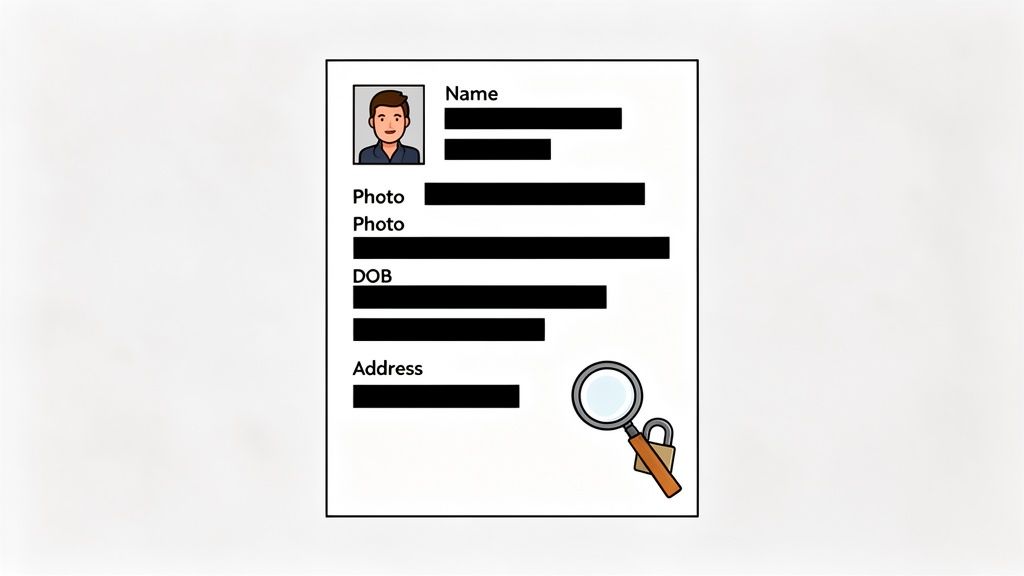
Redacting, or blacking out, parts of your documents before you upload them isn't just a good idea—it's standard practice. But you have to be smart about it. Covering up the wrong details will get your application bounced straight back to you.
For this check, think of your ID as having 'need-to-know' info and 'none-of-their-business' info.
What you should absolutely REDACT (cover up):
- National Insurance Number: There is zero reason for them to have this.
- Driving Licence Number: On a UK licence, this is the long number at position 5.
- Passport Number: The unique document number itself isn't required for this check.
- Bank Details: On a bank statement, black out all account/sort code numbers and every single transaction. They just need to see your name, address, and the date.
What you MUST leave visible and clear:
- Your Full Legal Name: This has to match what you entered during sign-up, character for character.
- Your Date of Birth: The entire point of the check is to prove you're over 18.
- Your Photograph: It must be crisp, clear, and totally unobstructed.
- Your Full Address: On utility bills or bank statements, this must be perfectly legible.
- Document Expiry Date: They need to see that your ID is still valid.
To do this properly, use any simple image editor to draw clean, solid black boxes over the sensitive data. Don't use a semi-transparent highlighter or a messy 'scribble' tool—these can sometimes be digitally reversed.
Read the Small Print—It Actually Matters Here
Before uploading anything, hunt down the site's Privacy Policy and Data Retention Policy. I know, it’s the most boring part of the internet, but spending two minutes on it is crucial. You’re looking for straight answers to a few key questions:
- How long do they keep your ID documents after you're approved?
- Is your data encrypted when you upload it and when it's stored on their servers?
- Do they share your info with other companies for verification? (Most do).
- What happens if they have a data breach?
A trustworthy platform will have this information laid out clearly. If the policies are hard to find, vague, or filled with confusing legalese, that’s a massive red flag about how they treat your data.
Under the Online Safety Act, platforms are legally required to use robust age assurance systems. This often means they partner with specialised tech companies. While this can improve security, it also means your data might pass through more than one set of hands. Knowing this helps you make a more informed choice.
A Note on Third-Party Verification Tools
It's very common to be redirected to a separate interface to complete your ID checks, often run by a company like Yoti, Ondato, or Veriff. These specialist firms handle the heavy lifting of document scanning and the 'liveness' selfie check.
While this often means a more professional and secure process, it's just another link in the chain handling your sensitive information. Many of these services are subject to very strict data protection laws, but it's worth being aware of. The technology powering these checks is constantly evolving, and you can learn more about the different types of age verification apps and how they operate.
Ultimately, protecting your privacy is a balancing act. You have to provide what's required, but you should do it strategically. By carefully redacting your documents and understanding a site's data policies, you stay in control.
What to Do If Your Verification Gets Rejected
It’s incredibly frustrating to get that “Verification Failed” email. You’ve gone through all the steps, uploaded your documents, and then… rejection. It feels personal, but trust me, it’s almost never a final ‘no’. Think of it less as a rejection and more as the system saying, "hang on, something doesn't quite add up, can you check this for us?"
Most of the time, it's a small, easily fixable mistake. Knowing the common tripwires is the best way to get it right on the second attempt.
Names and Addresses Not Matching Up
This is, hands down, the number one reason applications get stuck. The name on your ID, the name on your proof of address, and the name you enter into the site’s form have to be identical.
We’re not talking about your preferred name; we’re talking about your official, legal name as it appears on your documents.
- Nicknames & Variations: If your passport says 'Katherine' but your utility bill is addressed to 'Katie', that’s a mismatch. The system, whether automated or human, will flag it instantly.
- Address Details: It can get ridiculously specific. If your driving licence has 'Apartment 4B, 123 High Street' but your bank statement just says 'Flat 4B, 123 High St', that tiny difference can be enough to trigger a rejection.
The fix? Before you upload anything, physically lay your documents out next to each other and compare them. If you spot a difference, you'll need to use another document that matches exactly. In the long run, it’s worth contacting your bank or utility company to get them to update your details so they align perfectly with your primary ID.
A classic example is when someone's legal name on their passport is different from the name on a shared household bill. In this case, always default to the document that provides the perfect match, even if it’s not your go-to proof of address.
Poor Quality Photos and Documents
The second most common culprit is simply bad image quality. The software and the human reviewers on the other end need to see everything clearly. If you make their job hard, they’ll just send it back.
Run through this mental checklist before you hit submit:
- Is it blurry? If the text looks fuzzy or your photo is grainy, it’s an instant no. Use your phone's camera in a well-lit room, tap the screen to focus, and hold your hand steady.
- Any glare? Light bouncing off the plastic laminate of your ID can easily hide your photo or date of birth. Just tilt the document a little until the reflection disappears.
- Are your fingers in the way? It's such an easy mistake. Make sure your thumb isn't covering your name, the expiry date, or any part of the address. Hold it by the very edges.
- Is it expired? An out-of-date passport or driving licence is not a valid form of ID. Seems obvious, but it happens all the time. Check the dates first.
Why Are They So Strict? Blame the New UK Rules
It's easy to think platforms are just being difficult, but there’s a much bigger game being played. They are under massive pressure from UK regulators, and the entire landscape for the UK cam site verification process has been completely overhauled.
Following the UK's Online Safety Act 2023, these sites face enormous fines if they screw this up. The old days of ticking a box are long gone. One study found that some major adult sites saw their UK traffic plummet by 47% when they were forced to implement 'highly effective' age checks. You can read more about this in the BBC's coverage of the topic.
What this means for you is that there is zero wiggle room. What might have been overlooked a few years ago is now an automatic failure. Your name, address, and live facial scan have to create a perfect, verifiable triangle of data.
Getting these details right from the start isn’t just about passing verification; it's also about ensuring you get paid without any issues. Our guide on how to avoid payout delays on cam sites dives deeper into why consistent information is so critical.
When you realise they're just ticking legal boxes and not making a judgement on you, it's easier to give them exactly what they need. Be methodical, check every detail, and you'll get that approval email.
Got Questions About UK Cam Site Verification? We've Got Answers
Right, so you've got your documents lined up and you’re steeled for that slightly awkward liveness check. You get the 'why', but what about the nitty-gritty, practical stuff? Let's get into the questions that the official guides tend to gloss over.
How Long Does This Whole Thing Actually Take?
Everyone wants to know how long they'll be stuck in verification limbo. Most sites will quote a standard "24 to 72 hours", but that's a vague estimate. Honestly, if you nail your submission on the first try—we're talking crystal-clear photos and perfectly matching details—you could be approved in just a few hours.
But let's be realistic, delays happen. Trying to sign up over a bank holiday weekend? That’ll slow things down. A sudden rush of new creators joining? Yep, that too. The number one culprit for delays, though, is a problem with your documents. Any tiny mismatch or blurry photo yanks your application out of the automated queue and into a manual review pile, which can easily add days to your wait.
Pro Tip: My advice is always to submit your application on a weekday morning. You're far more likely to catch a full support team at their desks, rather than getting lost in a weekend backlog. A clean, first-time pass is the secret to getting verified quickly.
Can I Use a PO Box for My Proof of Address?
That's going to be a hard no. Every single time. Platforms need to verify where you physically live. It’s not about having a place to send you letters; it's a non-negotiable part of their legal duty to comply with Anti-Money Laundering (AML) and Know-Your-Customer (KYC) regulations.
A PO Box is designed for anonymity, which is the polar opposite of what they're required to prove. You'll have to stick to an official document that clearly states your residential address, like a recent utility bill, bank statement, or council tax letter.
What Happens If I Move or Change My Name?
Life moves on, and your details might change. If you move house or change your legal name after you've been verified, you absolutely must update your information with the platform. This isn't just admin; ignoring it can get your account suspended or your payouts frozen.
You’ll have to contact their support team and, essentially, go through the process again. Be prepared to provide new documents, like an updated driving licence with your new name or a recent bill showing your new address. It's a bit of a pain, but it's crucial for keeping your account active and compliant.
Do I Really Need to Do This for Every Single Site?
In a word: yes. Your verification on one platform means nothing to another. Think of each company as a completely separate entity with its own legal responsibility to vet its creators.
This isn't them being difficult; it's a direct result of a very strict regulatory climate. Under the new rules, each platform is individually on the hook for proving that every single person on their site is of legal age and correctly identified. This is all part of the crackdown driven by Ofcom's enforcement of the Online Safety Act from July 25, 2025, which forced UK platforms to adopt 'highly effective' age-assurance. Self-declaration just doesn't cut it anymore.
The shift was massive, leading to a 77% decrease in visits across many adult sites and putting platforms at risk of fines up to £18M for getting it wrong. So, they don't take chances. You can read more about these UK age check impacts on tomsguide.com.
It's just like applying for a job – you give your ID to each new employer. The principle is exactly the same here.
Is My Data Actually Safe After I'm Verified?
This is the big one, isn't it? The good news is that reputable platforms pour serious money into data security. A data breach would be catastrophic for their reputation and their business. They use strong encryption to protect your information both while you're uploading it (in transit) and when it's sitting on their servers (at rest).
That said, no system is ever 100% impenetrable. This is precisely why redacting information you don't need to share and understanding a site's data retention policy is so important. The Information Commissioner's Office (ICO) in the UK is very clear that data shouldn't be kept longer than necessary, so many platforms will securely delete your ID documents once the check is done.
Always, always read the privacy policy. If a site is vague about how it protects your data or for how long it's stored, take that as a massive red flag.