

As an adult creator, think of a VPN less like a tech gadget and more like a core part of your business toolkit. It’s the digital barrier that separates your professional brand from your private life, safeguarding you from serious threats like doxxing, online stalking, and intrusive data logging by hiding your real IP address.
Why a VPN Is Non-Negotiable for Adult Creators
Let's cut to the chase. Your digital footprint is your biggest vulnerability as a creator. Every time you go live, upload a video, or even just log in to your accounts, your home internet connection reveals a unique identifier: your IP address.
You can think of your IP address as your digital home address. It’s visible to the platforms you use, your internet provider, and frankly, anyone with the right tools to find it.
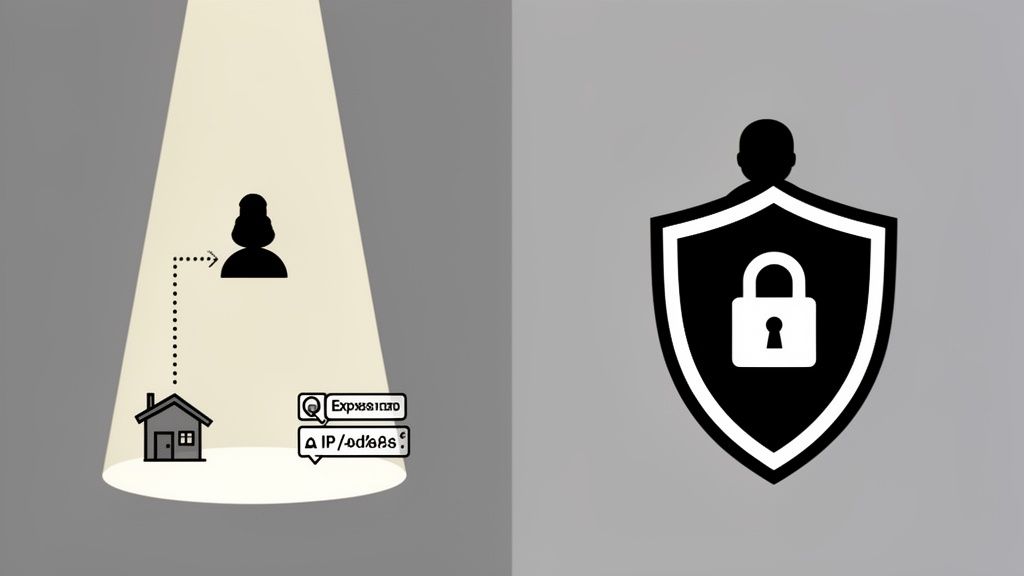
Left unprotected, this single piece of information can be traced back to your general physical location, making you an easy target for harassment, doxxing, or worse. This isn't just scaremongering; it's a genuine operational security risk in a field where you have to fiercely protect the line between your public persona and your private life. A VPN acts as your digital bodyguard, swapping out your real IP address for one from a secure, remote server somewhere else in the world.
To better understand the risks of going online without this protection, here’s a quick breakdown of the threats you face every day.
Creator Risk Profile Without a VPN
| Vulnerability | Specific Threat to Creators | How a VPN Provides Protection |
|---|---|---|
| IP Address Exposure | Doxxers can find your general location, leading to harassment or real-world stalking. | Masks your real IP with one from a remote server, making your location untraceable. |
| ISP Monitoring | Your Internet Service Provider sees and logs all your online activity, including the platforms you visit. | Encrypts all your traffic, so your ISP can't see what you're doing or where you're going online. |
| Platform Data Logging | Streaming sites and social media platforms log your IP address, linking your account to your location. | Provides an anonymous IP address, preventing platforms from connecting your activity to your home network. |
| Public Wi-Fi Risks | Using unsecured Wi-Fi (e.g., at a café or hotel) exposes your data to anyone on the same network. | Creates a secure, encrypted tunnel, protecting your data from hackers and eavesdroppers on public networks. |
This table isn't meant to be exhaustive, but it clearly shows that connecting without a VPN leaves critical aspects of your identity and safety exposed. A VPN directly addresses these vulnerabilities, giving you control over your digital presence.
The New Digital Reality in the UK
Recent legal shifts have, perhaps unintentionally, made this protection even more vital. In the UK, the push for greater online safety has had the knock-on effect of making privacy tools absolutely essential.
Take the UK's Online Safety Act 2023, for instance. It brought in strict age verification rules, which immediately caused VPN usage to surge. One provider reported a massive 1,400% jump in UK signups as people rushed to shield their privacy from third-party ID checks. This signals a much wider trend: whenever digital privacy is threatened, people instinctively reach for tools like VPNs to take back control.
This new reality puts your operational security under a microscope. Platforms are collecting more data than ever, and the risk of that data being leaked or misused is always there. For creators, the question is no longer if you need a VPN, but how deeply you should build it into your daily workflow.
A VPN is your first and best line of defence. It creates a necessary barrier between the person on camera and the person at home, transforming your digital address from a liability into an anonymous, protected asset.
Securing your location is a massive part of the puzzle, but it's not the only one. Getting to grips with the various adult streaming platforms and their individual rules is just as crucial for building a lasting career. At the end of the day, a VPN gives you the peace of mind to create and connect with your audience, knowing that your most sensitive personal detail—your location—is kept completely private.
How a VPN Works (Without the Technical Mumbo-Jumbo)
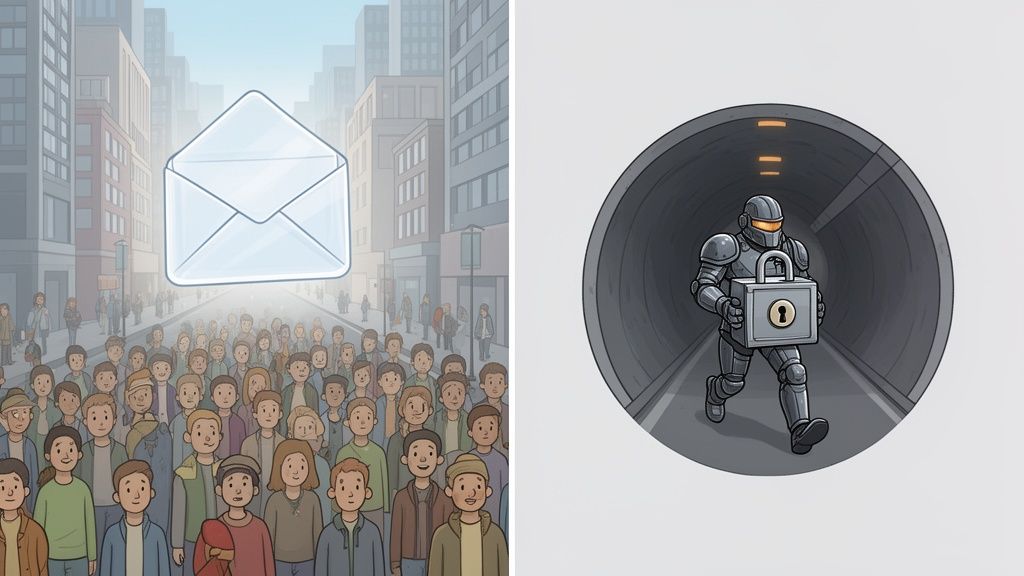
Imagine the internet is a massive, public postal system. Every time you visit a website, send a message, or start a stream, you're essentially sending a postcard. Anyone can look at it—your internet service provider (ISP), the websites you visit, and any prying eyes along the way. They can see what you wrote, who it’s for, and crucially, your return address: your IP address.
A VPN (Virtual Private Network) scraps the postcard and gives you a private courier instead. It takes your message, locks it inside an unbreakable steel box (encryption), and sends it through a secret, underground tunnel to a secure depot (the VPN server). Only then does the courier pop it in a public postbox to be delivered.
The upshot? Anyone watching just sees a reinforced van leaving a random depot. They have no clue where it really came from or what’s inside. Your real location is kept completely under wraps.
The Three Pillars of Your Digital Disguise
This whole privacy operation really boils down to three key moving parts. Get your head around these, and you'll know exactly what you’re paying for when you get a VPN for your adult creator business.
-
Your IP Address (The Digital 'Postcode'): Think of this as the digital postcode for your home network. It’s how websites send information back to you, but it also gives away your general geographic location. A VPN swaps this out for the server's IP address, giving you a temporary, anonymous address to work from.
-
The VPN Server (The Secure Middleman): This is a powerful computer owned by the VPN company, sitting in a data centre somewhere in the world. When you connect, all your internet activity is funnelled through this server first. It becomes the new starting point for all your online traffic.
-
Encryption (The Unbreakable Code): This is the magic that scrambles your data, turning it into complete gibberish for anyone trying to intercept it. Even if your ISP could grab your data, all they’d see is a meaningless mess of characters. Only your device and the VPN server hold the key to decode it.
It's this combination that turns your exposed connection into a private one.
How This Protects Your Stream
Let's put it into practice. Before you go live, you switch on your VPN. Immediately, your connection is wrapped in that encryption and rerouted to a server you’ve chosen—perhaps one in London, Manchester, or even another country entirely.
From that point on, the streaming platform doesn't see your home IP address in, say, Birmingham. It sees a connection coming from the VPN server in London. As far as the outside world is concerned, your digital location is London.
The core purpose of a VPN isn't about being sneaky; it's about reclaiming control. It gives you the power to decide who knows your real-world location, creating a vital separation between the performer and the private person with a single click.
This simple act of redirection is the most powerful tool in your arsenal for protecting your physical safety and enforcing professional boundaries. It’s the difference between broadcasting from an identifiable private home and an anonymous, secure location. For any creator, that distinction is absolutely everything.
Picking the Right VPN for Your Creator Business
Not all VPNs are built the same, especially when your income and personal safety are on the line. Choosing one isn’t like picking a streaming service—it’s more like hiring a bodyguard. You need to be able to trust them completely.
So many VPNs plaster their ads with promises of unblocking TV shows from other countries. But for a creator, the features that really matter are the ones working silently in the background to keep you safe. Let's cut through the marketing noise and get straight to what you actually need.
Think of this as your practical, no-nonsense checklist. Getting this wrong isn't just a minor tech headache; it could expose you at the worst possible moment.
The No-Logs Policy Is Non-Negotiable
First, and most importantly, you need a VPN with a strict, independently-audited no-logs policy. This is the absolute foundation of a trustworthy service. It's a guarantee that the VPN provider doesn't—and can't—store any records of what you do online.
What does "no-logs" actually mean? It means they don't keep tabs on:
- The websites you visit or the platforms you stream on.
- How long you stay connected or how much data you transfer.
- Your original, real IP address.
Without this policy, a VPN is just another company logging your data, which defeats the entire purpose. It's like hiring a security guard who keeps a detailed diary of your every move. Always, always check that their no-logs claim has been verified by a reputable, independent auditor. It's the only proof that they’re not just telling you what you want to hear.
Location, Location, Location: Where Is Your VPN Based?
This might sound like a trivial detail, but it's hugely important. The country where a VPN company is legally based—its jurisdiction—dictates which laws it has to follow when it comes to keeping and sharing data.
You want to find a VPN based in a country with strong privacy laws, well outside the reach of intelligence-sharing alliances like the "Five Eyes" (which includes the UK, US, Canada, Australia, and New Zealand). Places like Panama, Switzerland, or the British Virgin Islands are popular bases for top-tier VPNs for a reason—their laws don't force companies to store or hand over user data.
Choosing a VPN based in a privacy-haven jurisdiction is like putting your digital assets in an offshore bank. It adds a crucial layer of legal and political protection against data requests that a UK-based provider simply couldn't offer.
Your Digital Deadbolt: The Kill Switch
A kill switch is one of the single most critical safety nets a VPN can offer. Picture this: your VPN connection drops for just a second right in the middle of a live stream. Without a kill switch, your device would instantly reconnect to the internet using your real, completely exposed home IP address.
A kill switch prevents this catastrophe. It acts like an automatic deadbolt, instantly severing all internet traffic the moment the VPN connection fails. This ensures your true IP address is never accidentally leaked, not even for a split second. For any creator, this isn't an optional extra; it's a mandatory safeguard against accidental exposure.
Essential VPN Features for Creator Security
Beyond those core security pillars, a few practical features will make or break your day-to-day workflow. This table breaks down what you need and, more importantly, why you need it.
| Critical Feature | What It Means in Plain English | Why It's a Must-Have for Creators |
|---|---|---|
| High-Speed Servers | Fast, reliable connections that don't buffer or lag. | Streaming HD video eats up bandwidth. A slow VPN means a pixelated stream and frustrated fans, which hurts your earnings. |
| AES-256 Encryption | The same level of scrambling used by governments to protect top-secret data. | This is what makes your internet traffic unreadable to your ISP or anyone else snooping. Don’t settle for less. |
| Kill Switch | An automatic "off switch" that blocks your internet if the VPN disconnects. | Your ultimate safety net. It prevents your real IP address from being accidentally exposed during a connection drop. |
| Anonymous Payment | The ability to pay with cryptocurrency or gift cards instead of a personal bank card. | It severs the financial trail between your real identity and your creator persona, adding another vital layer of privacy. |
By prioritising these features, you're not just buying a piece of software. You're making a strategic investment in the safety, stability, and longevity of your creator business.
Getting Your VPN Set Up for Flawless Streaming
Alright, you’ve picked your digital bodyguard. Now, let's actually put it to work. A VPN is only as good as its setup, and a small mistake can leave you just as exposed as having no protection at all.
The real goal here isn't just to have a VPN; it's to weave it into your workflow so seamlessly that using it becomes second nature. Think of it like adjusting your lighting before a stream—it’s just part of the process. This guide will walk you through the practical steps, turning what sounds technical into a simple, routine part of your operational security.
Your Setup Checklist: Covering the Core Devices
You don’t just work from one device, so your protection shouldn't be stuck on one either. Your security is a chain, and it's only as strong as its weakest link. Let's get the essentials covered.
-
Your Streaming Laptop/PC: This is your command centre and the most critical device to protect. Install the VPN software directly from the provider’s official website—never, ever a third-party site. Once it’s installed, log in and get familiar with the main dashboard, especially the server list and the kill switch setting.
-
Your Phone: You use your phone for everything—promoting on social media, checking DMs, and managing your accounts. Get the official VPN app on your phone and keep it active, especially when you're on public Wi-Fi or interacting with fans. An exposed phone IP can be just as damaging as a leaked streaming IP.
-
Your Router (The Power Move): For total, set-and-forget protection, you can install the VPN directly onto your home router. This is a bit more advanced, but it means every single device connected to your Wi-Fi—from your laptop to your smart TV—is automatically protected. It’s the ultimate way to create a secure digital perimeter around your home life.
The following graphic breaks down the core decision-making process for choosing a VPN, zeroing in on the features that truly matter for your security.
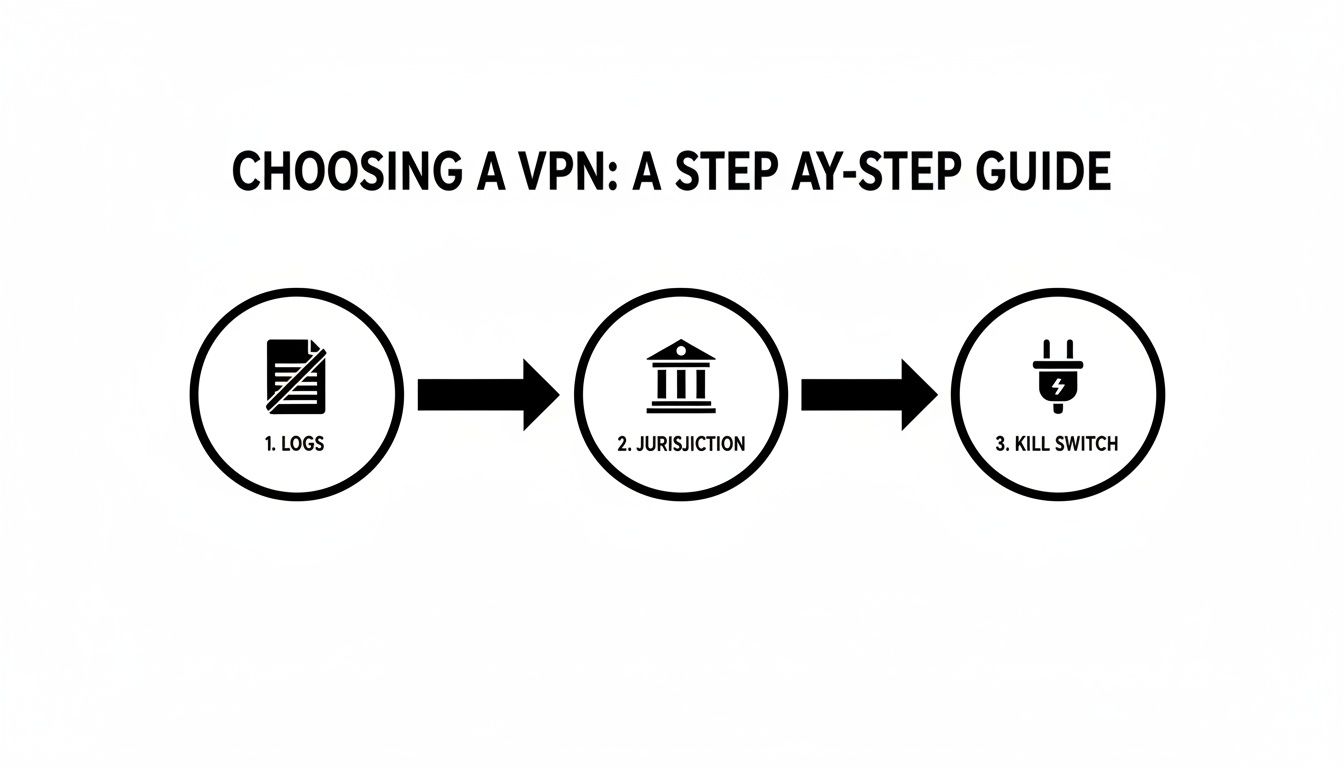
This visual flow makes it clear: your security foundation starts with a solid no-logs policy, is reinforced by a privacy-friendly jurisdiction, and is actively protected by a kill switch.
Smart Features for a Creator's Workflow
Modern VPNs come packed with clever features, but two, in particular, are genuinely useful for creators: the kill switch and split tunnelling.
A kill switch is your non-negotiable safety net. Always make sure it's enabled in your VPN's settings. It's the feature that automatically cuts your internet connection if the VPN drops for even a second, preventing your real IP from being accidentally exposed mid-stream. Think of it as your digital deadbolt.
Split tunnelling is more of a quality-of-life feature. It lets you decide which apps use the VPN and which ones connect normally. For example, you can route your streaming software (like OBS) through the VPN for protection, while letting your food delivery app use your regular connection so it knows where to find you.
Your Pre-Stream Security Ritual
Every single time before you go live, run through this quick mental checklist. It takes less than 30 seconds and could save you from a major security breach.
The 30-Second Pre-Live Check:
- VPN On? Is the app open and showing a secure connection to a server?
- Kill Switch Enabled? A quick glance at the settings to confirm your deadbolt is active.
- IP Leak Test: Open a browser and search "what is my IP". Does it show the VPN server's location, or your real one? This simple check confirms everything is working as it should.
This level of diligence has become increasingly standard across the UK. VPN adoption rates have skyrocketed, making the UK the top G7 nation for VPN usage, with 24.08% of internet users protected by 2024. This surge was accelerated by new regulations, leading to 10.7 million VPN app downloads in the first half of 2025 alone, as creators and users alike moved to anonymise their locations.
Making this process a habit transforms your VPN from just a piece of software into an integral part of your professional setup. It’s as essential as ensuring you have the best camera for live streaming—both are crucial investments in the quality and security of your business.
Common VPN Mistakes That Can Cost You
A VPN is a brilliant bit of kit, but it's not a magic invisibility cloak. It’s surprisingly easy to have the best VPN service on the market and still give yourself away through simple, totally avoidable mistakes. Knowing what these common traps are is just as vital as picking the right service to begin with.
This isn't about being paranoid; it's about being professional. Your entire setup depends on using this tool correctly, every single time you go online. Let's walk through the most frequent slip-ups that can undo all your hard work and put your business on the line.
The Myth of the "Free" VPN
Let's cut straight to it: there is no such thing as a truly free, safe VPN. If you aren't paying for the product with your wallet, you're paying for it with your data. These companies have to keep the lights on somehow, and that usually means logging everything you do and selling it on to data brokers.
Think of it this way: using a free VPN is often worse than using no VPN at all. You are literally handing your entire internet history to a company whose business model is built on selling your privacy.
For any creator, this is a catastrophic risk. That "free" service could be logging every platform you use, precisely when you're online, and your real IP address. All of this is bundled up into a detailed profile of you, ready to be sold to the highest bidder. Always, always invest in a reputable, paid VPN that has a proven no-logs policy.
Forgetting to Connect Before You Go Live
It sounds so basic, but it’s easily the most common mistake in the book. You're in the zone, sorting out your lighting, checking your mic, and getting your head right for the stream. In that pre-show rush, you forget to click that one crucial button: "Connect."
The moment you start your stream or log into a platform without your VPN running, you've already broadcast your real home IP address. Even if you catch the mistake a minute later and quickly switch the VPN on, the damage is done. That initial connection has been logged. Make it a habit: activating your VPN must be the very first step in your pre-stream checklist, no exceptions.
Mixing Your Personal and Professional Worlds
A VPN can't protect you from yourself. A classic blunder is finishing up a stream, still connected to your secure VPN, and then casually flicking over to your personal, real-name social media or checking your online banking.
Doing this creates a direct digital breadcrumb trail, linking your anonymous creator persona and your real-world identity to the very same IP address.
- Rule 1: Use completely separate web browsers (or at the very least, different browser profiles) for work and for your personal life.
- Rule 2: Never, ever log into personal accounts when you're in "creator mode."
- Rule 3: Set up unique, work-only email and social media accounts that have absolutely no connection to your real name or personal life.
Keeping these worlds strictly separate is a cornerstone of good operational security. Your VPN is one piece of the puzzle; your disciplined online habits are the other.
The recent scramble for online privacy tools shows just how easily these mistakes can happen. After the UK's Online Safety Act came into force, one VPN provider saw a staggering 1,400% jump in signups as people rushed to protect their identity. This kind of rapid uptake means many are likely using these tools without fully understanding the risks, making them prime candidates for common errors like picking a dodgy provider or forgetting vital security steps. You can explore more insights into how UK regulations are shaping privacy habits and what it means for creators and users alike.
Making Anonymity Your Greatest Business Asset
It's time to stop thinking of your privacy as just a defensive shield. For creators in the adult industry, strong anonymity is one of your most valuable business assets. It's the bedrock of a safe, sustainable career. Honestly, a well-configured VPN is one of the smartest investments you can make in your own longevity, security, and peace of mind.
A VPN draws a clear, firm line between your public brand and your private life. This separation is what allows you to build your business confidently, without putting your personal safety on the line. But here’s the thing: a VPN is just one piece of the puzzle. Real security is a mindset, a proactive approach that touches every single part of your online world.
So, what does that look like in practice? It means adopting a complete strategy for managing your digital identity.
- Strong, Unique Passwords: Get a password manager. Seriously. Let it create and store ridiculously complex passwords for every single one of your accounts.
- Two-Factor Authentication (2FA): Switch this on everywhere you possibly can. It’s such a simple step but provides a massive boost to your security.
- Meticulous Persona Management: Your work life and your personal life need to be completely walled off from each other. Think separate browsers, separate email addresses, and entirely separate social media accounts.
When you combine a powerful VPN for adult creators with these everyday security habits, you’re the one in control. This attention to detail becomes even more critical when you're handling sensitive information, a topic we cover in our guide to using an age verification app.
You're not just a creator anymore. You're a sharp business owner protecting your most important asset: yourself.
Common Questions from Creators About VPNs
Even with the fundamentals down, it’s natural to have a few nagging questions holding you back. Let's get straight to the point and tackle the most common "what ifs" and worries that adult creators face when considering a VPN. This is the no-nonsense FAQ section, designed to cut through the noise and give you the confidence to make smart choices about your safety.
Can Using a VPN Get Me Banned from Creator Platforms?
This is the big one, and the honest answer is: it’s a bit of a grey area. While some platforms might technically forbid VPNs in their terms of service, they're usually looking to stop fraud—things like users trying to cheat regional payment systems or get around content geo-blocks. They aren't actively hunting down creators who are simply trying to protect their home address.
The smartest way to play this is to use your VPN for security, not for deception. Just connect to a server in your own country, or even your own city. Your real IP address is still completely hidden, but you won't raise any red flags by looking like you’ve suddenly teleported halfway across the world. For the vast majority of creators, the massive security win of hiding your location from potential doxxers is well worth the tiny risk of any platform issues.
Will a VPN Slow Down My Stream and Hurt My Earnings?
Look, any VPN will cause a slight dip in speed. Your data has to make an extra hop to the VPN server, after all. But with a premium, high-speed VPN service on a decent broadband connection, the difference is usually so small you won't even notice it. You can absolutely maintain a high-quality stream.
This is precisely why free VPNs are a complete disaster for streaming. They are notoriously slow and overloaded, and they’ll almost certainly turn your crisp HD broadcast into a pixelated, buffering mess.
Pro Tip: Don't just take my word for it—test it yourself. Run a speed test with the VPN off, then run it again with the VPN on. If the drop is minimal and your upload speed is still comfortably above what your stream needs, you’re in the clear. A tiny trade-off in speed is a small price to pay for rock-solid security.
Is It Legal for Me to Use a VPN in the UK?
Yes, absolutely. Using a VPN is 100% legal in the United Kingdom. VPNs are mainstream privacy tools used by millions of people and businesses every single day for completely legitimate reasons.
The only time legality becomes an issue is if you use a VPN to do something illegal. But for a creator using a VPN for adult creators to secure their connection, hide their IP address, and protect themselves from stalking or harassment? It's not just legal; it's a highly recommended security measure. The recent explosion in UK VPN usage shows just how widely accepted and necessary these tools have become for online privacy.
Does a VPN Make Me 100 Percent Anonymous?
No, and this is a critical point to grasp. A VPN is an incredibly powerful tool for privacy, but it’s not a magic invisibility cloak. It’s brilliant at hiding your IP address and encrypting your internet traffic from your internet provider and the platforms you use.
But a VPN can't protect you from your own actions. Real security—what the pros call "operational security" or opsec—is about more than just software. It's a mindset.
Here are a few ways your anonymity can unravel, even with a VPN running:
- Logging into personal accounts: If you fire up your VPN and then log into your personal, real-name social media, you’ve just told the world that your "anonymous" work IP and your real identity are connected.
- Using personal payment details: Buying a prop for your stream with a credit card that’s linked to your home address creates a data trail that a VPN can't erase.
- Accidental on-stream reveals: A stray bit of mail on a table in the background or a reflection in a window can give away far more personal information than your IP address ever could.
Think of your VPN as a crucial layer in your security setup, but not the only one. It’s the foundation, but it needs to be combined with smart habits like using separate browsers for work, creating unique work-only logins, and being constantly aware of the information you share, both on and off camera.