Creator safety isn't some boring HR policy; it's the bedrock of a long and profitable career. Think of it less as a paranoid defence against creeps and more as the core business skill that separates a fleeting hobby from a sustainable enterprise.
Real safety is an active strategy, not a passive hope. It means protecting your identity, ring-fencing your income, and managing your own mental wellbeing. It's about being a pro.
The Unspoken Rules of Creator Safety
Let's get one thing straight: being a successful cam creator is about so much more than what happens when the camera is on. You're running a business where you are the brand, the CEO, and the entire staff. Like any entrepreneur, your biggest job is managing risk.
Thinking about creator safety on cam sites isn’t being paranoid; it's being professional. It's all the crucial, unglamorous work you do behind the scenes that allows you to perform with confidence, build a genuine community, and carve out a lasting career. This guide will skip the vague advice and get straight into the practical, real-world challenges you'll face.
The Foundations of a Secure Career
We're going to break down the non-negotiable skills that form the foundation of a safe online presence. These aren’t just handy tips—they're the essential competencies for this line of work.
- Protecting Your Identity: This is about building an unbreakable firewall between your online persona and your real life. It's your first and most powerful defence against doxxing, stalking, and harassment.
- Securing Your Finances: You need to make sure you get paid for your work without exposing your personal bank details or getting screwed over by scams and chargebacks.
- Managing Boundaries: You'll deal with everyone from devoted fans to demanding trolls. Setting and enforcing firm boundaries is key to keeping your stream—and your sanity—intact.
- Knowing the Rules: It's vital to understand the platform's rules and your legal position under UK law. You can get a primer on this in our guide on how webcam sites work.
When you reframe safety as a set of professional skills instead of a list of scary warnings, you take back control. It stops being a source of anxiety and becomes a tool that empowers you to focus on what you're truly there to do: create and connect.
This shift in mindset is everything. Strong safety habits aren't a roadblock to success; they are the very thing that makes a long-term, profitable, and sane career in this industry possible.
Building Your Digital Fortress: A Practical Guide to Anonymity
Your privacy isn't just a setting to be ticked on a website; it's your single most valuable business asset. Think of your online anonymity as a high-tech fortress. You wouldn't build a castle on dodgy foundations, and you shouldn't build a creator persona with flimsy digital walls. This is your blueprint for constructing an impenetrable online identity, one that’s completely sealed off from your real life.
This whole process is what security experts call Operational Security (OpSec). It might sound a bit cloak-and-dagger, but it’s the perfect term. It’s simply the practice of managing tiny, seemingly harmless pieces of information to stop them from being pieced together into a bigger picture that reveals who you are. For any creator in this space, solid OpSec is the absolute bedrock of long-term safety and success.
Step 1: Create Your Performance Persona
Your first job is to create a digital ghost—a complete persona that exists only for your work. This goes way beyond just picking a catchy name.
The Name Game: Your performance name has to be unique and, most importantly, un-googleable. Before you fall in love with a name, search for it in quotation marks. If it’s already linked to a real person, a business, or even a minor character in a book, ditch it. The goal here is zero connection to anything outside of your cam career.
Dedicated Accounts: Next, create a brand-new email address using this persona—one you'll use only for work. From that foundation, set up any work-related social media you need. Never, ever recycle a username from your personal life, no matter how obscure you think that old gaming forum handle is. Someone, somewhere, will find it.
This simple framework shows how your 'brand'—that is, your professional self—sits at the centre, protecting the three core areas you need to manage.
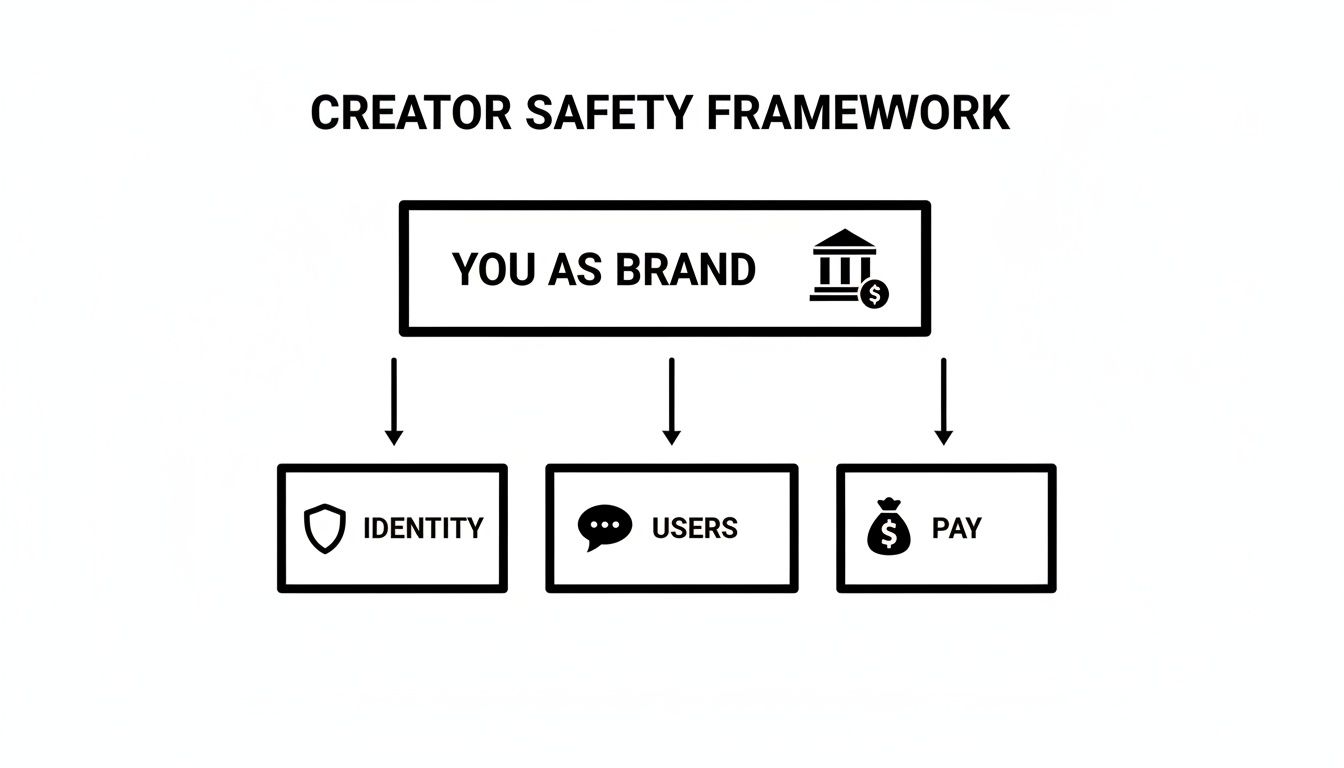
As the image shows, you are the brand. It's your job to actively manage the separate pillars of your professional identity, your interactions with users, and your payment systems to keep everything secure.
Step 2: Sanitise Your Streaming Space
Your broadcast area is a potential goldmine of personal information for anyone with a keen eye. The smallest detail can be the thread that unravels your entire anonymity. A reflection in a window, a local takeaway menu on the side, or the corner of a personal photo frame are all dangerous clues.
Your mission is to turn your room into a sterile, controlled set. Systematically remove anything that even hints at your location, your personal life, or your real identity.
The most common anonymity mistakes aren't grand technical failures. They are tiny, mundane slip-ups: a delivery label visible in the corner of a shot, a pet's name tag, or the sound of a specific local emergency siren in the background.
Take a hard look at the background of every shot. A plain wall is good; a custom backdrop is even better. It not only creates a consistent, professional brand look but also guarantees no personal details can accidentally sneak into the frame.
Step 3: Erase the Digital Breadcrumb Trail
Every digital photo and video you create contains a hidden layer of information called metadata, or EXIF data. This can include the make and model of your camera, the date and time a picture was taken, and most dangerously, the precise GPS coordinates of where you were standing.
Uploading a photo with this data intact is like handing out a map to your front door. Before you post any content online—promo pictures, social media updates, anything at all—you must scrub this metadata. There are plenty of free online tools and apps that can do this for you in seconds. Make it a non-negotiable step in your workflow.
Before each and every stream, it's worth running through a quick pre-flight check to make sure you haven't overlooked anything.
Your Anonymity Checklist Before Going Live
| Safety Check | Why It Matters | Quick Tip |
|---|---|---|
| Clear Background | Removes personal items, photos, or location-specific clues (e.g., mail). | A custom backdrop or green screen is your best friend for consistency and safety. |
| Check Reflections | Windows, mirrors, and even glossy screens can reflect your room or face. | Angle your camera away from reflective surfaces or cover them up before you start. |
| Mute Background Noise | Ambient sounds like specific sirens or local radio can reveal your city. | Use a good quality microphone with noise cancellation and keep windows closed. |
| Scrub Image Metadata | All promo photos must be stripped of EXIF data to hide your location. | Use a free online metadata scrubber tool before uploading anything. |
| Device Lockdown | Ensure no personal notifications (emails, texts) can pop up on screen. | Turn on 'Do Not Disturb' or 'Focus Mode' on all devices in the room. |
| Secure Your Connection | Protects your real IP address from being exposed to the platform or users. | Always connect through a reputable VPN service before you even open the broadcast software. |
This checklist isn't about paranoia; it's about professionalism. Getting these small details right every single time is what separates a sustainable career from a risky gamble.
Think of yourself as a secret agent. Your performance persona is your cover story, and your real life is the classified information it’s designed to protect. The two must never meet, cross-pollinate, or even acknowledge each other’s existence. This strict separation isn't about being dishonest; it's about being a pro and safeguarding your most important asset: you.
Managing Online Harassment and Difficult Users
Let’s be honest: dealing with trolls, time-wasters, and people who constantly push the line is just part of the job. But here's the secret successful creators learn quickly—you don't have to let them ruin your stream or your mood. Real creator safety on cam sites is so much more than just hitting the block button.
It's about getting good at spotting the classic types of problem users, shutting them down professionally, and protecting your own mental energy while you do it. Think of it like being the firm but fair manager of your own exclusive club. You decide who gets to stay.
Recognising the Common Problem Archetypes
Most of the difficult users you'll encounter aren't clever or original; they tend to be incredibly predictable. Once you know their patterns, you can deal with them in seconds and get back to focusing on your genuine fans.
- The Time-Waster: This person will clog up your chat with a million questions, vague promises about tipping "later," and constant demands for free attention. They expect hours of your time but will rarely spend a single token.
- The Overly Attached "Fan": They start to confuse the performer-audience dynamic for a real-world relationship. This can lead to them becoming possessive, getting jealous of other tippers, and demanding personal information or special treatment.
- The Boundary-Pusher: This user will constantly try to steer your show into territory you've clearly stated is off-limits. They'll ignore your rules and try to bully or guilt-trip you into breaking them.
- The Abusive Troll: Their only aim is to get a reaction. They use insults, slurs, and aggressive language to try and disrupt your stream and upset both you and your audience.
This isn’t just an industry problem; it's a huge issue online. Recent research from The Alan Turing Institute found that nearly 90% of UK adults aged 18-34 have been exposed to harmful stuff like hate speech and bullying. This hits streamers particularly hard, often in the form of misogynistic abuse from viewers who feel entitled after sending a tip. That’s exactly why you need a solid strategy in place. You can discover more insights about these online safety challenges on their site.
Mastering Your Moderation Toolkit
The moderation tools on your platform are your best friends. Seriously. They are the controls that put you in charge of your own room, and learning to use them inside and out is a non-negotiable skill for any successful creator.
The block button isn't a sign of failure; it's a tool for business efficiency. You are not obligated to entertain, educate, or debate anyone who disrupts your work environment. A quick, silent block is often the most professional response you can give.
Go beyond just blocking. Dig into your settings and get familiar with every feature on offer. Can you mute users for a few minutes? Can you set up word filters to automatically block common insults? Can you make trusted regulars moderators to help you manage the chat? Every platform has a slightly different setup, so it really pays to explore. If you want a deeper dive, you might find our guide on how cam platforms moderate content helpful.
Setting and Enforcing Iron-Clad Boundaries
Your stream, your rules. It really is that simple. The first step is to clearly post your rules in your profile bio or as a pinned message in your chat. This makes your expectations crystal clear from the moment someone enters your room.
Then, you have to be firm, fair, and above all, consistent. When a rule is broken, enforce the consequence immediately. This sends a powerful message to everyone else watching: your boundaries are not up for debate.
A simple three-step process works wonders for dealing with anyone breaking the rules:
- Warn: Give them one clear, brief warning. Something like, "Just a reminder, we don't do X here."
- Mute/Restrict: If they carry on, use a temporary mute. It stops them from disrupting things without escalating the situation right away.
- Block: If they still don't get the message, it's a permanent block. No drama, no long explanation needed.
This isn't just about getting rid of trolls. It's about cultivating a positive and safe space for the viewers who are there to support you and your work. By quickly and efficiently removing the bad apples, you protect the very community you’ve worked so hard to build.
How to Protect Yourself From AI Deepfakes
The rapid growth of AI has introduced a new, and frankly unsettling, threat for online creators. For those in the camming world, non-consensual deepfakes represent a particularly nasty form of digital harassment, where your own content is twisted and used as a weapon against you.
Let’s be real about the risks. Anything you broadcast can be screen-recorded. What’s changed is the terrifying ease with which that footage can be plugged into an AI tool and manipulated into fake explicit material that looks disturbingly convincing. This fabricated content can then be spread across the internet without you ever knowing.
Understanding the Scale of the Threat
Deepfake technology poses a serious threat to creator safety on UK cam sites. Research paints a stark picture: a shocking 98% of all deepfake videos online are pornographic. Of those, 99% target women, a huge number of whom are content creators. This makes cam streamers especially vulnerable, as their live sessions can be recorded and re-engineered into explicit fakes that are distributed without consent. You can learn more about the UK's response to these digital safety challenges and the evolving legal situation.
This isn’t some far-off, science-fiction problem; it's happening right now. The good news is that while you can't erase the technology, you can put harm reduction strategies in place to make yourself a much more difficult target.
Practical Harm Reduction Strategies
You can't eliminate the risk entirely, but you can build up defensive layers that make creating a believable fake of you a whole lot harder and less appealing for malicious people. It all comes down to being strategic and intentional with what you show on camera.
Here are a few practical steps you can take:
- Use Platform Watermarks: If your platform offers a watermarking feature, use it. Always. A username overlaid on your stream makes it much harder for someone to pass off the footage as their own or upload it elsewhere out of context.
- Vary Your Background: Try not to use the same static background for every single stream. A unique, complex, or regularly changing backdrop is significantly more difficult for an AI to convincingly replicate or manipulate.
- Be Strategic with Identifying Marks: Think carefully about distinctive tattoos, piercings, or birthmarks. I know they're part of your brand, but they're also unique identifiers that can make a deepfake seem more authentic. Consider how and when you choose to show them.
The goal isn't to become a blank slate, but to be a moving target. The more you vary your look, your set, and your presentation, the more data an AI would need to create a seamless fake—and the more likely it is that a lazy troll will move on to an easier target.
Legal and Platform-Level Defences
While your own actions are crucial, the bigger fight is taking place at the platform and legislative levels. Here in the UK, laws like the Online Safety Act are starting to introduce measures against sharing non-consensual intimate images, and that includes deepfakes.
But let's be honest, legal action can be slow, expensive, and emotionally draining. Trying to issue a takedown notice for every fake that pops up is an exhausting game of whack-a-mole. This is exactly why your choice of platform is so important.
Look for sites with strong, clearly written policies against deepfakes and manipulated content. A platform that takes identity verification seriously is also a massive plus. Proper verification makes it harder for bad actors to create anonymous accounts to harass creators or spread fake material. Ultimately, your best defence is a combination of your own smart practices and working with a platform that genuinely has your back.
Navigating UK Laws and Platform Rules
If you’re serious about building a secure, long-term career, you’ve got to understand the rules of the game. It might sound like a chore, but getting your head around UK laws and your platform’s terms of service is a massive power move. This isn’t just about avoiding a slap on the wrist; it’s about knowing your rights and picking platforms that genuinely have your back.
Think of it this way: a platform that’s lazy about its legal duties is probably lazy about creator safety, too. This isn’t a dry legal textbook—it’s your practical guide to making the system work for you, not against you.
The Online Safety Act: What It Actually Means for You
You’ve probably seen headlines about the Online Safety Act (OSA), but it can be hard to cut through the noise. For creators, the most important parts of this law really boil down to two things platforms now have to take seriously: proper age verification and better content moderation.
This is a pretty big deal. In the UK, the rollout of the OSA in 2023 has directly beefed up creator safety on cam sites by forcing platforms to implement high-efficacy age assurance (HEAA) to keep underage users out. With the media regulator, Ofcom, getting ready to start enforcement in late 2025, sites that don’t play ball are facing eye-watering fines. You can read a full breakdown of the Online Safety Act's impact to see how these changes are taking shape.
So, what does this change for you on a day-to-day basis?
- Tougher Age-Gating is Your Friend: It might feel like an extra step, but strong age verification is a huge win for your safety. It acts as a legal shield, proving you and the platform are taking all the right steps to make sure your audience is adults only. This massively reduces your personal legal risk and weeds out a lot of potential troublemakers from the get-go.
- Clearer Takedown Processes: The OSA means platforms can’t just shrug their shoulders anymore. They have a legal duty to have clear, effective systems for removing illegal content, like non-consensual images. If you’re ever targeted, they are legally required to act.
A platform's commitment to age verification is a direct indicator of its commitment to creator safety. If they're cutting corners on keeping minors out, you can bet they're cutting corners on protecting you, too.
Ultimately, the OSA is dragging the whole industry towards a more professional standard. Platforms can no longer treat safety as an optional extra; it’s a core legal requirement, and that gives you a lot more power. If you want to dive deeper into the nuts and bolts, check out our guide on how age verification apps work in this space.
Decoding Platform Rules Before You Sign Up
Every platform has its own rulebook—its Terms of Service (TOS). I know, they’re often painfully long and packed with legalese, but buried in there is everything you need to know about what you can do, what you can’t, and most importantly, what the platform promises to do for you.
When you’re checking out a potential new home for your stream, don’t just get dazzled by the commission rates. Dig into their safety and content policies and ask the right questions.
A good way to size a platform up is to look for a few key features. This table breaks down what separates a secure platform from a risky one.
Platform Safety Feature Comparison
| Safety Feature | What Good Looks Like | Red Flag to Avoid |
|---|---|---|
| Age Verification | Uses a third-party, document-based system for all users. | A simple "I am over 18" tick box with no real checks. |
| Content Policies | Clear, specific rules about harassment, hate speech, and illegal content. | Vague, one-line policies that leave everything to "discretion." |
| Reporting Tools | An easy-to-find, multi-option reporting system with ticket tracking. | A single support email address with no guarantee of a response. |
| Privacy Controls | Granular controls for region-blocking (geoblocking) and private shows. | No options to block specific countries or limit who can view you. |
Choosing the right platform is one of the biggest safety decisions you’ll make. A site with weak rules and zero enforcement isn't just an annoyance; it’s a genuine threat to your business and your wellbeing.
Always go for platforms that clearly and proactively invest in creating a secure environment. It’s simply the smart choice for building a career that lasts.
Your Questions Answered: A Creator Safety FAQ
We've explored everything from building your digital fortress to understanding UK law. Now, let’s tackle some of the most common and pressing questions that come up when you're focused on creator safety on cam sites. Consider this your go-to cheat sheet for staying secure.
What Is the Single Most Important Safety Step for a New Cam Creator?
Without a shadow of a doubt, it’s creating a rock-solid separation between your real life and your online persona. This is the heart of your Operational Security (OpSec).
Before you even think about signing up, pick a performance name that has zero connection to your real one. Create a brand-new email address used only for this work, and never, ever link back to your personal social media accounts. Your anonymity is your strongest shield; protect it fiercely from the very beginning.
How Can I Get Paid Safely Without Exposing My Bank Details?
You should never connect your personal bank account directly to any part of the platform that users can see. Good platforms act as the middleman, processing all the payments from viewers and then paying you without ever showing them your private info. Stick to the site’s built-in tipping system for everything on-platform.
If you make any sales off-platform, only use payment processors specifically designed for adult creators. It’s smart to check out a site’s payout options before you sign up to make sure they offer secure and discreet ways to get your money. This keeps a professional firewall between your work and personal finances, which is just good business sense.
Most doxxing threats are empty tactics from trolls trying to scare you. A calm, swift report-and-lockdown response is the correct professional move. It shows you're in control, not them.
What Should I Do if a User Threatens to Dox Me?
First things first: take a breath and stay calm. Do not engage with them, don't give in to demands, and don't feed the troll. The moment it happens, block the user and immediately report them to the platform's support team. If you can, grab screenshots as evidence to send with your report.
Next, do a quick privacy check-up on yourself. Search for your performance name online and scrub any personal details that might have accidentally slipped through. Handling these situations calmly and professionally is always the best response.
Is Using a VPN Really Necessary for Camming?
Yes, one hundred percent. A quality VPN (Virtual Private Network) isn't a "nice-to-have"; it's an essential layer of your security setup.
A VPN works by hiding your real IP address, which is a little piece of data that can easily reveal your city or even your general neighbourhood. This simple tool stops technically-minded users from figuring out your rough physical location. It's a low-cost investment that puts up a massive wall against anyone trying to poke holes in your anonymity. You should have it running every single time you log in or go live, no exceptions.