
At its core, your cam model setup needs three things: a high-quality webcam, good lighting, and a clear microphone. You can absolutely get started for under £150, but investing in gear that makes you look and sound professional is the fastest way to boost your earnings and build a loyal following.
Your Cam Model Toolkit: From Budget To Pro
Getting your setup dialled in is the bedrock of a successful streaming career. Let’s be real for a moment: this isn't about having the most expensive toys. It’s about having the right equipment to present yourself in the best possible light, literally.
Think of your stream as your digital shop front. A blurry, poorly lit broadcast is like a boutique with grimy windows and flickering lights—it just doesn't invite people in.
This section is your practical shopping list, breaking down the core gear every creator needs. We'll go from an affordable kit that gets you online and earning, all the way to the professional-grade setup that top models use for those flawless, high-definition streams that viewers love.
What Really Matters in Your Setup
Before you start filling your online shopping basket, remember that viewers are paying for quality and connection. Grainy video and crackly audio create a disconnect, making your show feel amateur. A crystal-clear image and crisp sound, on the other hand, build intimacy and give viewers a reason to stick around and spend their tokens.
Here’s a quick look at what we’ll cover:
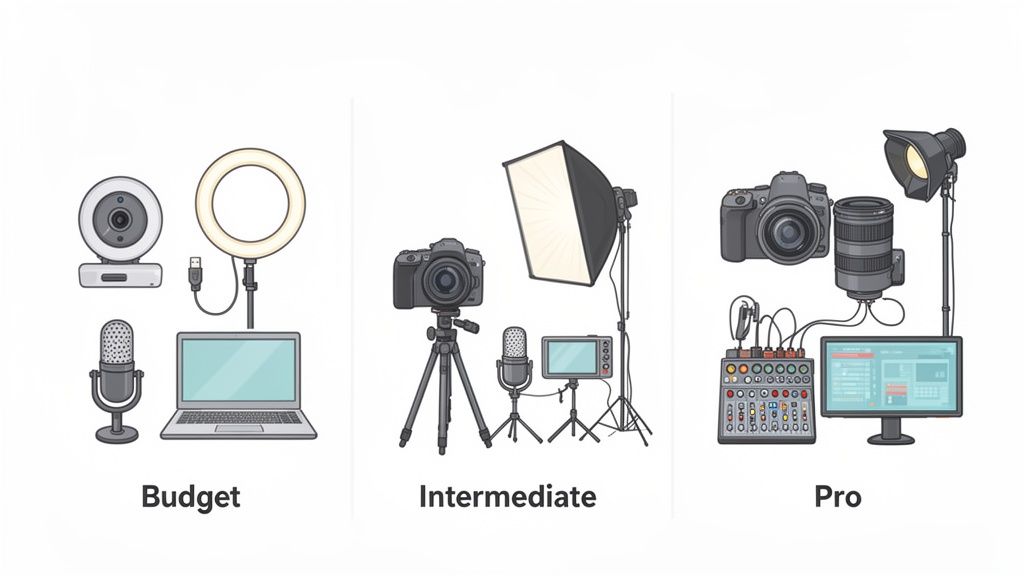
- The Budget Starter Kit: The absolute essentials to get you broadcasting without a huge initial cost. This proves you don’t need a massive budget to start earning.
- The Intermediate Upgrade: Smart investments to make once you’ve got a steady income. This is where you’ll see a significant jump in your production quality.
- The Professional Studio: The high-end gear that sets the top earners apart. This is for when you’re ready to treat streaming as a full-time, high-production business.
We’ll break down why each piece of equipment for cam models matters, from the camera that captures every smile to the lighting that makes you shine. This way, you can invest wisely at every stage, putting your money where it will make the biggest impact on your earnings.
Your gear is an investment, not an expense. Every pound spent on improving your stream's quality is a pound spent on increasing your potential earnings. A £100 ring light can easily pay for itself in a single good session.
Choosing the right equipment depends on where you are in your career and your budget. Here's a breakdown to help you decide what's best for you right now.
Cam Model Equipment Tiers Comparison
| Equipment Tier | Key Gear | Estimated Cost (UK) | Primary Benefit |
|---|---|---|---|
| Budget Starter | 1080p Webcam, USB Mic, Ring Light | £100 – £250 | Accessibility: Gets you online and earning with a clean, professional-looking stream without a big upfront cost. |
| Intermediate | 4K Webcam/Mirrorless Camera, Condenser Mic, 2-3 Point Lighting | £300 – £800 | Quality Boost: Delivers a noticeably sharper image and richer audio, helping you stand out and justify higher rates. |
| Professional | DSLR/Mirrorless Camera, XLR Mic with Audio Interface, Key/Fill/Back Lights | £1,000+ | Flawless Production: Provides cinematic video quality and broadcast-grade audio for an immersive, premium viewer experience. |
Ultimately, the goal is to create a setup that allows your personality to shine through without any technical distractions. Start where you're comfortable, and upgrade as you grow.
Choosing Your Camera: The Heart of Your Stream
Let's get straight to it. Your camera is, without a doubt, the single most important piece of gear you'll buy. It's the lens your audience sees you through, the device that translates your personality into pixels. A great camera makes you look professional, desirable, and worth their time and tokens. A bad one? It can make you look like you’re broadcasting from a basement in the '90s.
This isn't just about ticking spec boxes. It’s about understanding what that choice means for your stream in the real world. Viewers don't just see a higher resolution; they feel a stronger connection, and that's something that shows up directly in your earnings.
The UK webcam market is booming for a reason—it’s projected to hit nearly £560 million by 2035, driven by creators who get this. Investing in a high-resolution feed can boost your tips by as much as 40%. Why? Because better immersion makes the whole experience far more compelling for your viewers.
Webcams: Good Enough to Start, Smart Enough to Earn
A modern, high-end webcam is your entry ticket into professional streaming. I’m not talking about that grainy, built-in camera on your old laptop. A dedicated 1080p or 4K USB webcam from a reputable brand is a massive leap forward.
For most small to medium-sized rooms, a quality webcam is really all you need. They are completely plug-and-play, need minimal technical fuss, and deliver a sharp, clean image that instantly tells viewers you’re serious about this.
- 1080p (Full HD): This is the baseline. Anything less just won't cut it. It’s crisp, clear, and doesn’t demand a beast of a computer or a super-fast internet connection to run smoothly.
- 4K (Ultra HD): This offers four times the detail of 1080p. While it sounds impressive, streaming in true 4K needs a powerful PC and a very fast, stable upload speed. The real pro-move for many is to use a 4K webcam to stream a downscaled but incredibly sharp 1080p image.
A good webcam is the smartest first investment. It’s an affordable piece of kit that delivers immediate, noticeable results right out of the box.
Don't get lost in the numbers. A well-lit 1080p stream from a quality webcam will always look better than a poorly lit 4K stream. Lighting and camera quality work hand-in-hand.
Upgrading to Mirrorless or DSLR Cameras
Ever seen a top earner with that soft, blurry background and a crystal-clear, cinematic look? They’re almost certainly not using a webcam. They’ve levelled up to a mirrorless or DSLR camera. This is the professional tier.
These cameras have much larger sensors that are fantastic in low-light conditions. This means you can create an intimate, moody atmosphere without the picture turning into a pixelated mess. The real game-changer, though, is having interchangeable lenses.
Swapping out a lens can completely change the vibe of your show:
- Wide-Angle Lens: Perfect for capturing your entire performance space, especially for dynamic shows where you move around a lot.
- Prime Lens (e.g., 50mm f/1.8): This is the secret to that dreamy, blurred background (called 'bokeh'). It makes you pop from the screen, creating a focused, high-end look that viewers associate with premium content.
Using a "proper" camera for streaming isn't as simple as plugging in a USB cable. You'll need a capture card (like an Elgato Cam Link 4K) to convert the camera's HDMI output into a signal your computer can recognise as a webcam. It’s an extra step and an extra cost, but the jump in visual quality is undeniable. For a deeper dive, check out our guide on finding the best camera for live streaming to explore specific models and setups.
Practical Choices for Your Space
The right camera depends entirely on your setup. What works for a cosy bedroom stream is different from what you'd need for a dedicated studio where you might be doing more elaborate shows.
- Small Bedroom Setup: A high-quality 4K webcam is your best bet. It delivers a sharp image, works well in tight spaces, and is incredibly simple to get going.
- Dedicated Studio Space: A mirrorless camera with a versatile lens is the superior choice here. It gives you full creative control over your shots, performs beautifully in varied lighting, and delivers that premium aesthetic that can justify higher private show rates.
Think of your camera as your direct connection to your audience. Choosing the right one is about matching your ambition and budget with the technology that will best showcase you. Start smart, and upgrade when the time is right.
Mastering Your Lighting And Audio
If your camera is the heart of your broadcast, then lighting and audio are its soul. It doesn't matter if you've invested in a top-of-the-line 4K camera; a poorly lit room will make it look cheap, and viewers won't stick around if they have to deal with tinny, echoing sound. Getting these two elements right is what truly separates the professionals from the amateurs and turns a simple stream into an immersive experience.
This is about more than just being seen. It's about crafting a mood. Forget just making things bright; the real goal is to create flattering light that eliminates harsh shadows, gives you depth, and makes you look incredible from every angle. The good news? You don't need a Hollywood budget to achieve it.
The Magic of Three-Point Lighting
In any kind of video work, the gold standard is three-point lighting. It might sound a bit technical, but the idea is actually very simple and works for any budget. It uses three separate lights to sculpt how you look on camera, giving your appearance a polished, almost three-dimensional quality.
- Key Light: This is your main and brightest light. You'll want to place it slightly off to one side and angle it down towards you, lighting up one side of your face.
- Fill Light: Positioned on the opposite side, this one is a bit softer. Its only job is to fill in the shadows created by the key light so you don't look like you're half in darkness.
- Back Light: Sometimes called a hair light, this one goes behind you and often a little higher. It creates a soft glow around your hair and shoulders, which is the secret to separating yourself from the background and really making you "pop" on screen.
You can achieve this professional effect without breaking the bank. A couple of affordable softboxes and a ring light are more than enough to get the job done.
Smart Lighting Choices for Every Budget
When you're choosing your equipment, be practical. Ring lights are massively popular for good reason—they create a soft, even light that’s incredibly flattering and dead simple to set up. Placing one directly in front of you minimises shadows and creates that classic circular catchlight in your eyes.
If you want more creative control, a pair of softboxes is an excellent next step. These are essentially lights diffused through a fabric box, which creates a much softer, more cinematic glow than a bare bulb. You can use one as your key light and the other as your fill, giving you complete command over the atmosphere of your stream.
Whatever you do, avoid using your main overhead room light as your primary source. It casts awful, unflattering shadows down your face, creating what is grimly known in the industry as "monster lighting."
This chart shows how your camera choice might evolve as your needs grow.
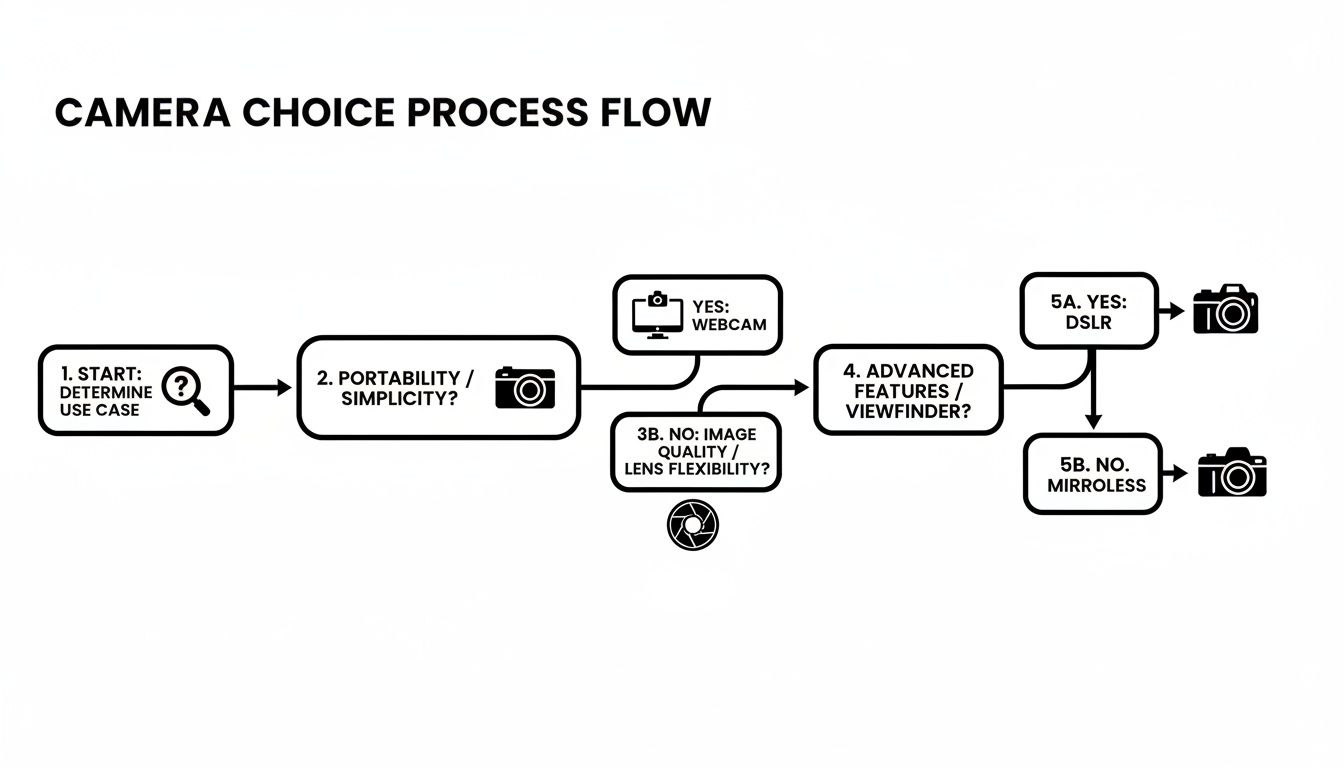
As the visual shows, moving from a basic webcam to a more advanced mirrorless or DSLR setup is a natural progression for creators who get serious about quality.
Why Your Audio Cannot Be an Afterthought
Now, let's talk sound. Believe it or not, audio is often more important than video. An audience might forgive a slightly grainy picture if the vibe is right, but they will click away in seconds if your audio is terrible. Echo, static, and that muffled sound from a built-in laptop mic are instant mood-killers that make your stream feel amateurish.
A dedicated USB microphone is absolutely non-negotiable. It's a simple plug-and-play device that offers a huge leap in quality, capturing the richness of your voice without all the annoying background hiss.
Here's how to get the best results from it:
- Get the positioning right: Place the mic fairly close to your mouth but just out of the camera's view. This ensures it picks up your voice clearly without capturing too much room echo.
- Use a pop filter: This is a cheap little foam or mesh screen that sits in front of the mic. It softens those harsh "p" and "b" sounds, preventing the audio from "popping" and distorting.
- Soften your surroundings: Hard surfaces like bare walls and wooden floors are your enemy. They cause sound to bounce around, creating that dreaded echo. Adding soft furnishings like a rug, curtains, or even some throw pillows will absorb the sound and make your audio much cleaner.
Putting a little money into decent lighting and a solid USB mic will have a bigger impact on your stream's quality—and your potential earnings—than almost any other upgrade you can make.
The Unseen Tech That Powers Your Stream
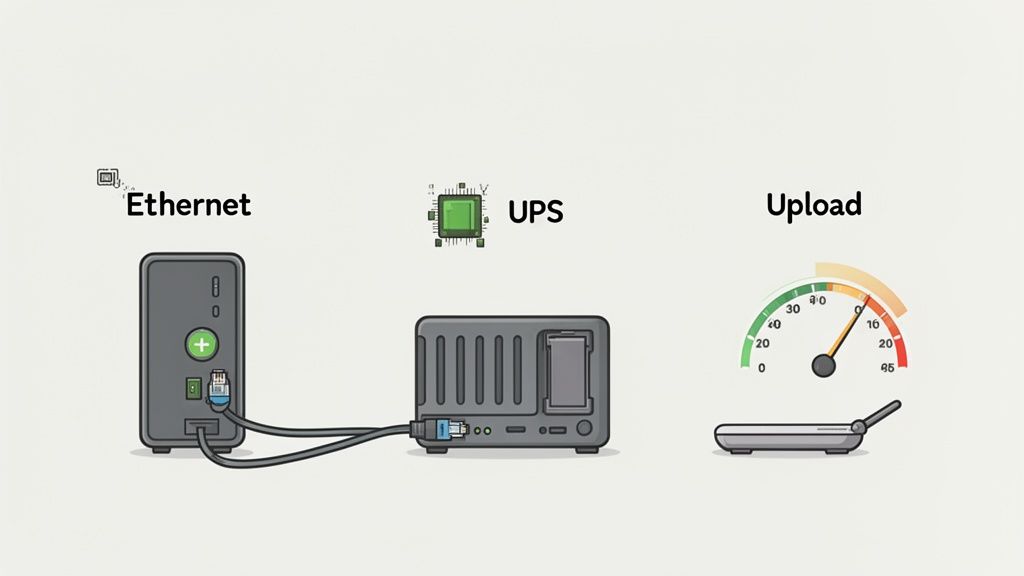
Your slick camera and perfect lighting might get all the glory, but they’re completely useless without the quiet, workhorse tech humming away in the background. A buffer-free stream that keeps viewers engaged relies on a rock-solid technical foundation. Let’s talk about the unsung heroes of your setup: your computer, internet connection, and backup power.
There’s nothing that kills the vibe faster than a lagging stream. When a private session freezes or your public chat turns into a pixelated mess, it shatters the connection you’ve worked so hard to build. Making sure your core tech is up to the job isn't just a minor detail—it's absolutely fundamental to your earnings.
Your Computer: The Engine of Your Show
Think of your PC or Mac as the central nervous system of your entire operation. It has to juggle a high-definition video feed, manage multiple chat windows, run your broadcasting software, and handle payments all at the same time. An underpowered machine will quickly start dropping frames, causing that dreaded stuttering that makes your stream unwatchable.
You don’t need a ridiculously expensive gaming rig, but you do need a machine that can keep up. For a smooth 1080p stream, here’s a realistic baseline to aim for:
- CPU: A modern Intel Core i5 or AMD Ryzen 5 processor is a brilliant starting point. The CPU does the heavy lifting, encoding your video in real-time.
- RAM: 16GB of RAM is the real sweet spot. You might just about get by with 8GB, but 16GB gives you plenty of breathing room to run everything smoothly without your machine slowing to a crawl.
- Graphics Card (GPU): A dedicated graphics card takes a huge amount of strain off your CPU. Something like an NVIDIA GTX 1660 or newer can handle the video encoding effortlessly, leaving your processor free to manage everything else.
Think of your computer specs as an investment in your own reliability. Every single dropped frame is a potential lost tip. A stable machine means a stable income, it’s as simple as that.
Your Internet Connection: The Lifeline
Your internet connection is the invisible pipeline that delivers your show to the world. And here’s a critical point that so many people get wrong: your upload speed is far more important than your download speed. Downloading is for watching Netflix; uploading is for broadcasting yourself.
The absolute golden rule? Always use a wired Ethernet connection. Wi-Fi is handy, but it's notoriously unstable and prone to interference from everything from your microwave to your neighbour's network. A cheap Ethernet cable running directly from your router to your computer is one of the most reliable bits of kit you can buy.
For a high-quality 1080p broadcast, you should be aiming for a consistent upload speed of at least 10 Mbps (megabits per second). You can check yours for free on sites like Speedtest.net—just make sure to run the test a few times throughout the day to get a realistic average.
The Overlooked Saviour: Your Power Supply
Picture this: you’re in the middle of a fantastic private show, the tips are flying in, and then—bang. Everything goes black. A power cut just cost you hundreds of pounds in a split second. This is a totally avoidable disaster.
This is where an Uninterruptible Power Supply (UPS) becomes your absolute best friend. It’s basically a big battery that your computer and key equipment plug into. If the power cuts out, the UPS instantly takes over, giving you several precious minutes of power.
This crucial window of time allows you to:
- Politely end your private session and explain what’s happened.
- Gracefully sign off from your public stream without just vanishing.
- Safely shut down your computer properly to avoid data corruption.
A basic UPS for your PC, modem, and camera is a small one-time cost that protects you from major financial loss and a whole lot of frustration. It’s the professional’s insurance policy against the unexpected. If you're looking for other ways to streamline your workflow, a powerful stream deck alternative can also make managing your broadcast much easier, especially during a hectic session.
Securing Your Setup And Protecting Your Privacy
In this line of work, your digital security is every bit as important as your physical safety. The very same gear that connects you with your fans can leave you exposed if it’s not properly locked down. This isn't about paranoia; it's about being a professional and building a digital fortress around your business so you can perform with total peace of mind.
The golden rule is to keep your personal life and your work life completely separate. That means never, ever using your personal phone, laptop, or email for anything related to camming. Think of your streaming setup as a clean room—nothing from your real-world identity should ever cross that threshold.
This separation isn’t just a good idea; it’s a critical security boundary. Using a dedicated 'work' computer and phone means a slip-up on one side doesn't torpedo the other. It's the digital version of not giving out your home address.
Creating Your Digital Fortress
Building this separation starts with your hardware. Your streaming PC should be for streaming and nothing else. No personal banking, no logging into your private social media, no checking personal emails. This kind of isolation is what prevents accidental leaks of your private info.
Your privacy is your most valuable asset. Once it's gone, you can't get it back. Treating your digital security with the same seriousness as your financial security is non-negotiable for a long-term career.
A huge part of this fortress is masking your location online. A Virtual Private Network (VPN) is essential equipment for cam models. It works by funnelling your internet traffic through a different server, which hides your real IP address—something that can be traced back to your general physical location. Make it a habit to always have your VPN running before you even think about opening your streaming software.
Hardening Your Streaming Computer
"Hardening" is just a techie way of saying you’re making your computer a much tougher target for anyone trying to snoop. It’s all about disabling features you don’t need and locking down access, turning your PC into a secure, single-purpose machine for your work.
Here’s a practical checklist to get you started:
- Use a separate user account: On your PC, create a standard, non-administrator account that you only use for streaming. This seriously limits the damage an intruder could do if they ever compromised that account.
- Install robust security software: A top-notch antivirus and firewall are your first line of defence. Don't cheap out on the free, built-in options; it’s worth investing in a reputable paid solution.
- Enable Two-Factor Authentication (2FA): Turn on 2FA for every single account related to your work—your cam platform logins, payment accounts, and your work email. This adds a crucial extra step, making it incredibly difficult for someone to get in, even if they manage to steal your password. For a deeper dive, our article on the security behind an age verification app shows how these layers protect sensitive data.
- Cover or unplug your webcam: When you're not live, physically cover your webcam lens or just unplug it. Software can be hacked, but a piece of tape or a lens cover is a foolproof physical barrier.
- Manage your microphone: The same goes for your mic. Make sure it's muted or unplugged when you're not using it. This stops any rogue software from secretly listening in.
This kind of disciplined approach isn't just for tech experts. It's a set of simple, repeatable steps anyone can follow to protect their identity and their income.
Physical Security and Your Streaming Space
Your digital security measures need to bleed over into the real world. Take a hard look at the background of your shot. Are there any personal photos? Unique posters? Is there a window showing a recognisable landmark or building? Anything that could give clues about your location or personal life has to go.
Some models take this even further, using tech to protect their physical space. As the UK digital camera market grows, driven by creators needing professional gear, we're seeing parallels with the smart home security sector. Indoor security cameras, which make up 40% of that market, can be repurposed to monitor a private studio, with features like motion alerts giving you real peace of mind against intrusions. You can learn more about the trends in the UK digital camera market on TechSci Research.
At the end of the day, a secure setup lets you perform with confidence. Knowing you’ve taken the right steps to separate your public persona from your private life is the professional foundation you need to build a successful and sustainable career.
Your Top Equipment Questions Answered
Let's dive into some of the most common questions I hear from models, both new and experienced, about their gear. These are the practical, no-fluff answers you need when you're trying to get a stream running smoothly or figure out where to spend your money next.
Can I Really Start with Just My Smartphone?
Technically, yes. But should you? Absolutely not.
While the camera on a modern phone is surprisingly good, relying on it is a huge privacy and security risk. It directly links your work to the device that holds your personal contacts, private photos, and location history. That's a boundary you don't want to blur.
Besides the security nightmare, a phone setup just doesn't look professional. It's often shaky, the sound quality is usually dreadful, and it can signal to viewers that you aren't taking this seriously. A dedicated webcam is an inexpensive first step that creates a vital separation between your personal life and your work.
Is 4K Worth the Extra Cost?
This one depends on your goals and your current setup. A 4K webcam is a fantastic investment, but maybe not for the reason you think. Broadcasting in true 4K resolution requires a beast of a computer and a rock-solid, incredibly fast upload speed—something most people simply don’t have.
The real pro move is to use that 4K camera to stream a flawless 1080p feed. By capturing a massive amount of detail and then downscaling it to 1080p, the final image is unbelievably crisp and clean. It’s a huge step up from what a native 1080p camera can produce. So yes, it’s worth it, but for the quality boost it gives your HD stream, not for broadcasting in full 4K.
Think of it this way: a good camera makes your viewers feel like they are in the room with you. A great camera makes them forget there's a screen between you at all. That level of immersion is what opens up wallets.
What’s the Single Most Important Upgrade After a Webcam?
Audio. Without a doubt, a dedicated USB microphone.
Audiences will put up with a slightly grainy video feed, but they will click away in an instant if your audio is crackly, muffled, or full of echo. Bad audio completely shatters the intimate connection you’re trying to build.
A quality USB mic is a simple, plug-and-play solution that will make you sound clear, professional, and present. It’s a relatively small investment that delivers a massive, immediate improvement to your stream quality. Don’t sleep on this one.
Do I Need a Green Screen?
Probably not, unless you’re aiming for a very specific, niche type of show. Green screens are used to digitally replace your background, which can be a cool effect but often feels artificial. Plus, getting the lighting right so you don't look like a fuzzy, pixelated mess can be a real headache.
Most viewers actually prefer seeing you in a real, well-designed space. A clean, tidy room with some soft lighting and a touch of personality is far more effective at building a genuine connection than a fake, computer-generated background. Your best bet is to focus on making your physical space look inviting first.
This focus on high-quality visuals isn't just a niche concern. In 2023, UK households spent a massive £1.13 billion on photographic equipment, highlighting how crucial top-tier cameras have become for all content creators. While a 2023 survey found only 22.5% of UK adults own a dedicated camera, the highest-earning cam models are firmly in the professional minority who upgrade their setups for the superior control over lighting and angles that directly boosts tips. You can explore more data on UK photographic equipment purchases from Statista.
How Do I Stop My Stream from Lagging?
Lag is the ultimate session-killer. If your stream is stuttering, it usually boils down to one of three culprits. Here’s a quick troubleshooting checklist to run through:
- Check Your Upload Speed: Your download speed is irrelevant here; it's all about the upload. Run a speed test. For a smooth 1080p stream, you need a stable upload of at least 10 Mbps.
- Use a Wired Connection: Ditch the Wi-Fi. It’s prone to interference and instability. A physical Ethernet cable plugged directly from your router into your computer is non-negotiable for a reliable broadcast.
- Review Your PC Specs: If your internet connection is solid, your computer might be the bottleneck. Check if your CPU and RAM are being maxed out while you stream. Simply closing unnecessary background apps can often make a world of difference.